One miswired coax termination can bring an entire 4K or 8K broadcast facility to its knees — silently, instantly, and at the worst possible moment. Most engineers treat cabling as an afterthought, yet it carries every signal that keeps a live production alive. Fibre specifications, 75-Ohm standards, rack discipline, and redundancy planning aren’t optional details — they’re the difference between a flawless broadcast and catastrophic failure. What follows will permanently change how you plan, execute, and verify every installation.
What Infrastructure Does a Broadcast Network Cabling Setup Actually Need?
Before selecting cables and connectors, you need to grasp what a broadcast network cabling setup actually requires. Every professional installation shares core components that connect your entire operation.
Your foundation includes:
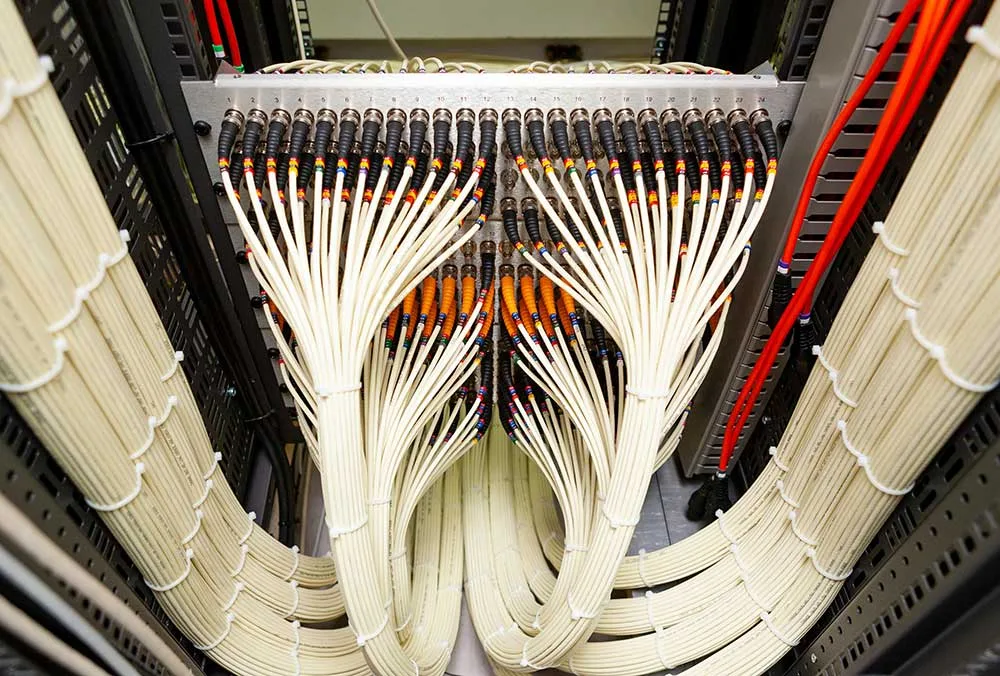
- A 19-inch, 42U server rack measuring 800×800 mm with mounting hardware, ventilation fans, and label kits
- Patch panels with duplex LC and ST connectors for organised signal routing
- Conduits and cable trays separating power from signal lines to reduce interference
- Broadcast equipment connections supporting SMPTE hybrid fibre, RG-6 coaxial, and Cat6A shielded cabling
Site surveys map pathways, interference points, and future expansion needs before installation begins.
Planning ahead delivers a great result. Overbuilding power capacity by 15–20% and installing dark fibre protects your infrastructure long-term. Large single-storey facilities benefit most from fibre-first designs, as distance limitations of baseband copper cabling create signal degradation challenges across expansive footprints.
Broadcast environments demand zero-failure infrastructure standards because live television cannot buffer and live radio cannot experience audio dropout, making every cabling decision a critical one.
Which Cables Perform Best in High-Density Broadcast Environments
Most broadcast engineers agree that cable selection defines signal integrity in high-density environments.
Cable selection isn’t optional — it’s the foundation that determines whether your signal survives a high-density broadcast environment.
You’ll find that coaxial cables and fibre optic cables each serve distinct roles in professional setups.
Coaxial cables use 75-Ohm impedance, reducing signal loss across your routing infrastructure.
Fibre optic cables transmit light signals, eliminating electromagnetic interference entirely.
Here’s what top-performing cables deliver in high-density broadcast environments:
- 75-Ohm coaxial cables maintain precise impedance for HD-SDI signals
- 3G-SDI coaxial runs reach up to 538 feet (164m)
- 12G-SDI transmission supports distances of 257–321 feet (78–98m)
- Fibre optic cables handle 4K/8K workflows without copper attenuation issues
- 4K@60Hz requires 18 Gbps bandwidth capacity
Your infrastructure performs best when you match cable type to resolution and distance requirements. Professional broadcast facilities commonly deploy tactical fibre optic drums alongside heavy-shielded SDI cables to support both permanent studio installations and mobile outside broadcast operations. Triaxial camera cables minimise signal loss and reduce noise to preserve image quality in demanding broadcast connectivity situations, making them a strong choice for live production environments.
Cable Routing Best Practices for Live Broadcast Facilities
Cable routing shapes the reliability of your entire broadcast facility. You’re part of a community that comprehends poor routing causes signal failure, safety hazards, and costly downtime. Plan your network cabling pathways carefully through detailed site surveys.
Follow these key practices:
- Separate power and signal cables to prevent EMI interference
- Use cable trays for horizontal runs and conduits for exposed routes
- Secure cables in high-traffic areas with ramps or multi-channel protectors
- Label both ends of every cable clearly
- Test all connections before live broadcasts
Your cabling network performs best when organisation supports troubleshooting. Use Velcro ties and sub-snake boxes for tidy patching. Apply LSZH cables in public spaces and make sure firestopping at all penetrations. Structured routing delivers a great result every broadcast. In critical broadcast environments, redundant system design with automatic failover capabilities ensures uninterrupted signal flow when individual cabling components experience unexpected faults. Oversize your conduits and install extra dark fibre to ensure your broadcast infrastructure remains ready for higher bandwidth demands and future technology expansion.
The Standards Your Broadcast Cabling Installation Has to Hit
Every broadcast cabling installation has to meet recognised standards or you risk signal failure, compliance penalties, and costly rework. These standards protect your infrastructure and keep your facility compliant.
Key standards your installation must meet:
- ANSI/TIA-568: Governs structured cabling, including Cat6 supporting 10 Gbps at 250 MHz
- ANSI/TIA-569-E: Defines conduit, cable tray, and equipment room requirements
- ANSI/TIA-606-D and 607-E: Covers labelling, documentation, bonding, and grounding
- ISO/IEC 11801: Class Ea supports 10 Gbps at 500 MHz over 100 metres
- SMPTE 311M: Hybrid cable standard for broadcast camera-to-CCU connections
Use T568A or T568B terminations consistently across every connection. Your broadcast infrastructure performs reliably when every installer follows the same rulebook.
Meeting these standards is a great result for your entire team. Network outages carry an estimated cost of 4,344 dollars per minute, making compliant cabling infrastructure a direct financial safeguard for your broadcast facility. Broadcast-grade facilities also rely on long-distance tactical fibre optic cables to maintain signal integrity across large venues such as convention centres without degradation or interference.
How to Troubleshoot and Maintain Broadcast Network Cabling Over Time
Broadcast network cabling requires ongoing inspection and testing to stay reliable over time. You’ll want to visually check cables for cuts, bends, crimps, or exposed insulation regularly. Loose connectors cause intermittent failures, so verify that every cable seats securely into its port.
Use diagnostic tools like blinky testers and OTDRs to identify faults accurately. For fibre, measure optical power at 850 nm, 1300 nm, 1310 nm, or 1510 nm depending on cable type. These measurements confirm your infrastructure performs like your professional audio gear and audio mixing console — precisely and consistently. Broadcast cabling installations should use thick shielded cables with neat organisation and perfect termination standards to ensure signal integrity across every run.
Also validate your IP addresses, subnet masks, and DNS settings periodically. Configuration mismatches cause CRC errors that degrade your entire broadcast network. You’re part of a professional community that demands reliable infrastructure — maintain it accordingly. When evaluating connector performance, keep in mind that TIA/EIA maximum connector loss is specified at 0.75 dB per connector.